

Trade Ideas Review
Real-Time Scanner · AI Signals
Best for: Active day traders who need real-time scans and want optional Premium features such as Holly AI Signals and backtesting. These are research tools, not evidence of future performance.
Inside Trade Ideas: scan windows, simulation and AI distinctions
How this section was prepared: Official product pages and interface examples checked October 20, 2026. This is a research-based walkthrough, not a firsthand execution or performance test. Vendor screenshots can show historical versions and example data. Greenwick may earn referral fees through links on this page.
Distinguish an Alert window from a Top List
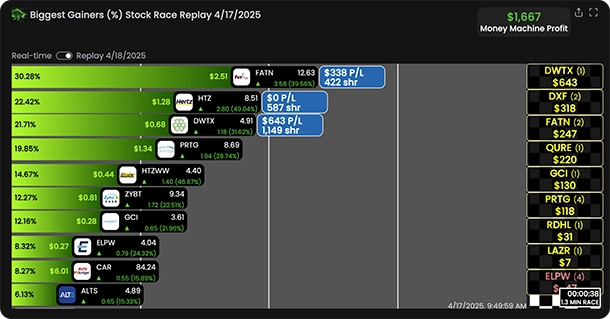
Trade Ideas describes streaming events through Alert windows and ranked candidates through Top Lists. The distinction affects how the workspace is used: one tells you an event happened, while the other organizes symbols meeting filters. Begin with a defined universe and condition so that every row has an explainable reason to appear.
The AI assistant and AI signals are different products
Current documentation distinguishes Holly’s assistance with chart context and scanner configuration from the separate signal product. Inspect the generated conditions rather than trusting an English description alone. An AI explanation does not establish causation, and a vendor’s selected successful example is not a representative performance record.
Testing requires explicit execution assumptions
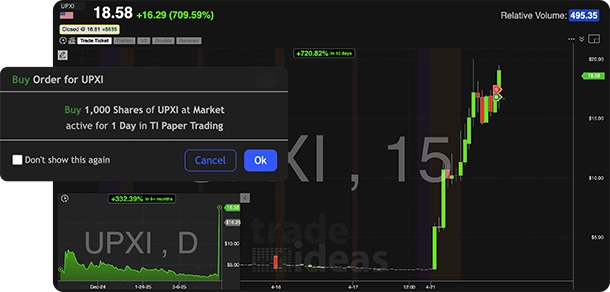
OddsMaker and simulation tools can support investigation of a rule. Record the entry, exit, session, costs and fill assumptions, then validate on data not used for tuning. A chart containing a simulated order is an interface example, not proof of live tradability. Broker connections and automated execution require their own compatibility and risk checks.
A practical evaluation workflow
- Start with one existing channel or documented alert condition.
- Read every filter and inspect an individual match on its chart.
- If using AI configuration, compare the actual conditions with your original hypothesis.
- Use simulation or historical testing with preserved assumptions before any live automation.
Fit and trade-offs
Trade Ideas can suit a trader who needs a configurable real-time scanning and research environment. Its complexity and subscription cost are justified only by a workflow the trader can explain and evaluate.
Primary references: Current pricing and plan features · Streaming Alerts and scanner details · Top Lists and screener details · Live trading and supported brokers
Put the features into practice: Build a scanner and watchlist, then review the decisions in a trading journal.
Trade Ideas at a Glance
| MONTHLY PRICE | Standard $127/month or $1,068/year · Premium $254/month or $2,136/year (checked 20 Oct 2026) |
| FREE TRIAL | Free email account with no card; limited-time live access, duration not stated |
| PLATFORMS | Windows Pro desktop and web dashboard; simulated trading on web and Pro (Mac desktop requires a supported Windows setup) |
| AI ENGINE | Holly AI Signals (Premium) |
| SCANNING | Real-time Streaming Alerts; 308 alerts and 249 filters listed by the vendor |
| BACKTESTING | Premium backtesting; current plan details apply |
| BROKER INTEGRATION | Interactive Brokers, TradeStation, E*TRADE, Alpaca, CenterPoint and Cobra (check supported setup) |
Overview & Ideal Trader Profile
Trade Ideas combines real-time stock scanning with Top Lists, charting and paper trading. Standard includes real-time data, customizable scans and screeners, and paper trading. Premium adds first-generation AI signals, backtesting, smart risk levels and automated trading. The pricing page lists these as separate features; it does not establish every Holly output as a proven or independently validated recommendation.
The product is aimed at active traders who want to configure and monitor scans during the session. Traders who only need a static screener, a simple charting tool, or long-term portfolio research may not use enough of its intraday feature set to justify the subscription.
Scanning Engine & Real-Time Data
Trade Ideas separates Streaming Alerts from Top Lists: alerts report matching market events, while Top Lists rank stocks that meet selected conditions. Its scanner page currently describes 308 alerts and 249 filters, with examples including gap and relative-volume conditions. Confirm individual filters and data access in the account you plan to use.
Streaming alerts are designed to update as matching events occur. A scanner can help surface candidates, but it does not guarantee a fill, liquidity, or a profitable setup.
Holly AI & Automation
Trade Ideas lists first-generation AI signals in Premium, alongside separate backtesting and auto-trading features. Do not assume an AI signal specifies an executable entry, exit, or suitable position size for your account. Automated orders require supported broker setup and risk controls.
An AI-generated signal is a prompt for further research, not a vetted result or a promise of accuracy. Review its conditions, test assumptions, and decide independently whether it fits your written plan.
Backtesting & Charting
Premium includes backtesting, and the product also offers simulated trading. Use tests to examine a clearly defined rule, then account for costs, liquidity, slippage and out-of-sample performance. Historical or simulated results cannot establish how a live order will fill.
The learning curve is real: the interface is dense and takes time to configure well.
Pricing, Value & Reputation
For a serious day trader who trades daily, the time saved on idea generation can justify the price; for casual traders it is hard to recoup.
Trade Ideas Pricing (checked 20 October 2026)
| Free | Free account available |
| Standard | $127 a month, or $1,068 a year (about $89 a month) |
| Premium | $254 a month, or $2,136 a year (about $178 a month) |
From Trade Ideas pricing, checked 20 October 2026. Standard lists real-time data and in-app trading; Premium adds auto trading.
A Pre-Market Momentum Workflow in Trade Ideas
Trade Ideas lists “500+ Data Points (Alerts & Filters)”, price alerts and customizable scans. Alert windows stream events as they happen. Top Lists update every 15 seconds. A practical morning looks like this:
- Build a top list for gappers with your price range and a minimum volume.
- Open an alert window for new highs on the same universe, so new names appear as they break.
- The official scanner page documents gap and relative-volume examples. Check your plan and selected alert configuration for the exact filters available; I did not confirm a float filter on the cited pages.
- Save the layout and review which alerts led to clean moves after the close.
Top Lists update every 15 seconds according to Trade Ideas’ official screener page. Streaming Alerts report matching events as they happen.
How It Sits Next to Your Broker’s Level 2 and Order Entry
Trade Ideas says live order entry runs in its Windows Pro desktop app through a connected broker. Its current live-trading page names Interactive Brokers, TradeStation, E*TRADE, Alpaca, CenterPoint and Cobra. Brokerage Plus displays positions and P&L and can place orders from configured templates; chart trading and autotrading are separate workflows. Confirm your broker connection method and permissions before relying on them.
Trade Ideas does not show Level 2 on the pages we checked. Keep your broker’s montage and time and sales open next to it, and send the entry from the platform where you can see the book. See order routing and Level 2.
The Honest Breakdown
Pros
- Powerful real-time scanning engine
- Premium includes Holly AI Signals; testing and auto-trading are separate features
- Customizable scans and many configurable alert conditions (plan limits apply)
- Premium backtesting and simulated trading
- Broker integration for auto-trading
Cons
- Expensive ($127–$254/mo)
- Steep learning curve
- Overkill for casual or long-term traders
- Desktop app can be resource-heavy
Trade Ideas Questions
How much does Trade Ideas cost?
Trade Ideas offers a free account with limited-time live access. Standard costs $127 monthly or $1,068 annually; Premium costs $254 monthly or $2,136 annually. Confirm current terms on the official pricing page. Prices checked 20 October 2026.
Can you trade directly from Trade Ideas?
Trade Ideas says live orders are available in the Windows Pro desktop app through supported connected brokers. Its current list includes Interactive Brokers, TradeStation, E*TRADE, Alpaca, CenterPoint and Cobra; check the vendor’s broker setup guide for your connection.
How often do Trade Ideas top lists update?
Trade Ideas’ official screener page says Top Lists update every 15 seconds. Streaming Alerts report matching events as they happen.
The Bottom Line
Trade Ideas is a feature-rich real-time scanner with optional AI signals, backtesting and broker-connected order tools. Its annual Standard plan is $1,068 and Premium is $2,136; monthly billing costs more. It may suit traders who will use these features regularly and verify each workflow, while casual users may find the cost and learning curve difficult to justify.
Active traders who scan during the session and want to evaluate optional AI signals and premium testing tools.
Casual traders, long-term investors, or anyone on a tight budget who won’t use it daily.