
Short answer: ZenBot Stock Scanner is worth evaluating as a configurable research workspace if you understand its data timing. The free experience carries a 15-minute delay; Turbo is the paid live-data tier. For a small-cap trader, that distinction matters more than how many panels fit on screen.
What we checked, November 13, 2026: a brief anonymous browser session, opening In Play, viewing its scan explanation, switching to Cards and then Top Longs. We saw populated results and the delay label. We did not test a paid account, notification delivery, the AI connection, data accuracy, latency or trading results.
This review concerns the stock scanner at zenbotscanner.com. It is not a review of other software using the Zenbot name. For Zendoo’s livestream and member access, use the separate Zendoo guide.
Free vs Turbo · What the browser check showed · Evaluation checklist · AI connection
ZenBot Free vs Turbo: start with data timing
| Question | Free | Turbo |
|---|---|---|
| Data timing | 15-minute-delayed data. | Vendor describes live data. |
| Listed price | $0. | $25 per month; check current checkout terms. |
| Starting point | Anonymous browsing was available in our limited check. | Paid access; not tested by Greenwick. |
| Evaluation question | Can I understand and review the scan’s conditions? | Does the eligible live-data workflow solve a defined need? |
Pricing and tier descriptions come from the official product page, checked November 13, 2026. It advertises a 14-day trial. Confirm the renewal price, payment requirements and cancellation process before starting one.
A delayed research screen can help you learn the interface and examine a historical-looking snapshot. It does not establish the price available now in your broker. Switching to a paid feed would not, by itself, validate a trading strategy or guarantee fills.
What our limited browser check showed
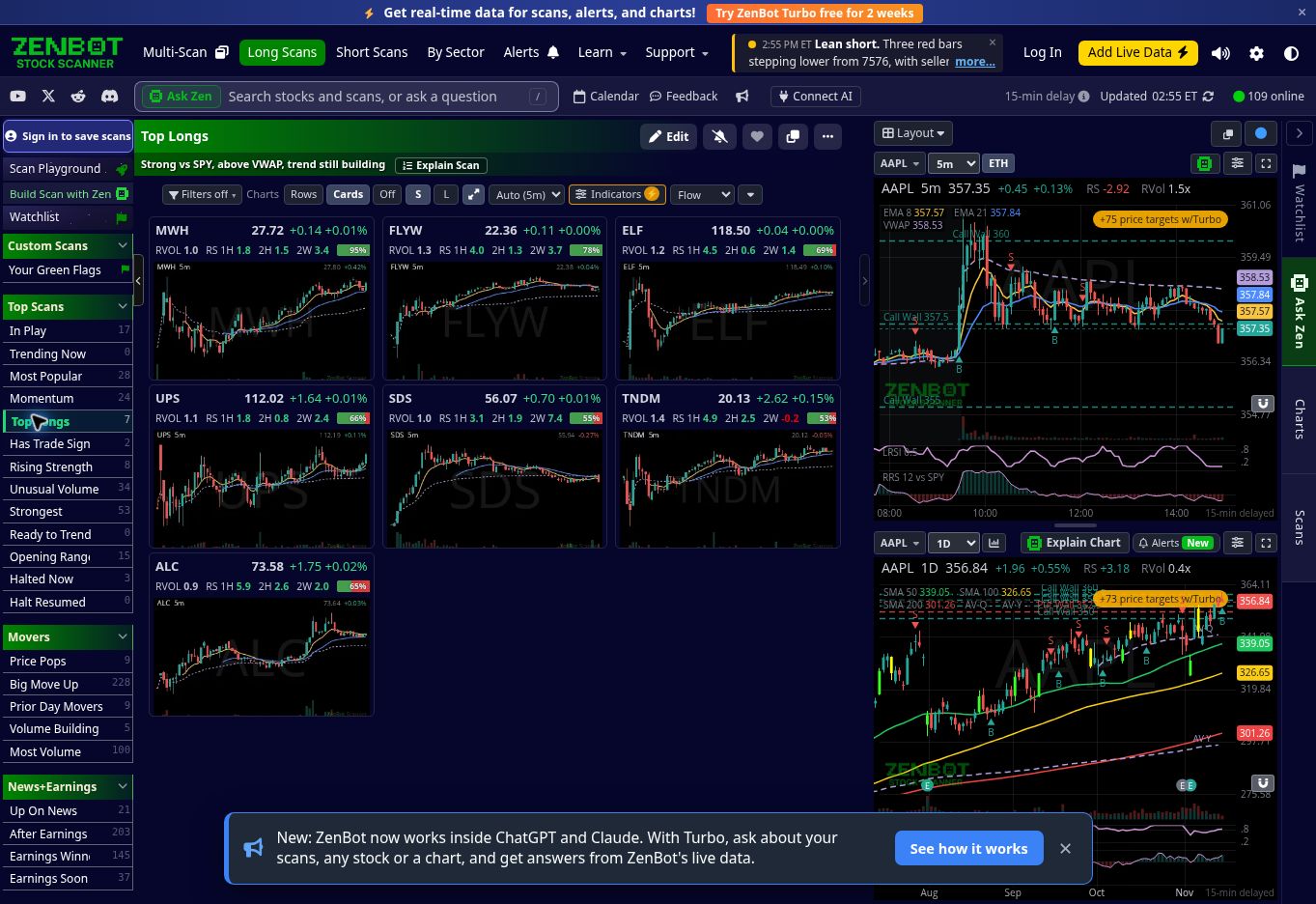
Scan names lead to different candidate lists
In Play and Top Longs both loaded during our check. The latter displayed chart cards beside larger chart panels. This confirms that those views were accessible in that session; it does not establish that every scan, chart or feature will work for every account.
Explain Scan exposes the selection process
The In Play explanation displayed a sequence of conditions and counts showing how the candidate universe narrowed. That is useful for asking why a symbol appears or disappears. We did not independently recompute the conditions or verify the underlying market data.
When evaluating any such explanation, separate the stated rule from its current result. A correct-looking filter description does not prove complete data coverage. Preserve the rule and observation time before comparing the list with another platform.
Cards change how you review the list
The Cards control produced a grid of chart previews. It can make a visual review easier, but it also makes hindsight selection easy: the best-looking later chart can dominate your memory of the list. Record why you investigated a candidate at the time, including names you rejected.
A fair small-cap evaluation checklist
- Define one job. Candidate discovery, chart review and notification delivery need separate checks.
- Read the scan’s conditions. Check the universe, price restrictions, volume definitions and the session involved. A familiar scan name is not a universal rule.
- Confirm timing. Keep the delay label and displayed update time in your notes. Compare the same observation time across sources.
- Check a candidate independently. Verify the original catalyst and liquidity in a suitable source. A scan result is a reason to investigate.
- Log the decision. Preserve the scan, symbol, timestamp, displayed values and investigate/reject reason before the outcome.
- Review the cost. Use a realistic activity estimate in the trading-cost calculator. More trades are not a way to justify a subscription.
Use the free planner for research notes and the free journal for manual trade review. Neither automatically imports ZenBot scans or validates the displayed numbers.
Can ZenBot connect to ChatGPT or Claude?
The official site describes Connect AI as a Turbo feature for asking about scans, tickers and charts, including creating saved scans. We saw the connection entry in the free interface, but did not connect an account or test its answers. An advertised integration is different from a tested result.
If you evaluate it, inspect the returned data time, scan definition and original source. Review a generated rule before saving it. An AI explanation should not turn a delayed or incomplete observation into a claim about a currently tradable setup.
Watch for differences between anonymous and signed-in access
The November 4 feature update describes a new watchlist and stock alerts. It also says signed-in free accounts receive unlimited charts while anonymous viewing has a daily limit. Other documentation has described limits differently, so we do not give a universal chart quota here.
Before subscribing for a limit you believe you have hit, establish whether the message applies to anonymous browsing, a signed-in free account or the specific paid tier. We did not create an account to test those boundaries.
Who should evaluate it first?
Start with the free browser experience if your immediate question is whether you can understand the scans and organize research. If your task depends on current intraday notifications, first verify the timing and features of the eligible paid offer; the delayed free session cannot answer that question.
For a different scanner’s configuration workflow, see the MOMO Pro settings guide. For the underlying method, read building a scanner and watchlist. These are different products and research tasks, not an independently measured speed comparison.
Educational review. The limited free-interface check is described above; paid capabilities remain vendor-documented. No profitable outcome, data-accuracy rating or uptime score is established. Greenwick may earn referral fees through some links on this site; see our disclosure.